
HTML5Point - Working
Convert Your PowerPoint Presentation to HTML5 with HTML5Point 4.0

Convert PowerPoint to HTML5
HTML5Point is a PowerPoint plug-in that automatically converts Microsoft PowerPoint presentations to HTML5 format. HTML5Point is the easiest alternative that lets you create HTML5 presentation without any programming abilities. First step towards developing a HTML5 slideshow would be creating a PowerPoint presentation.
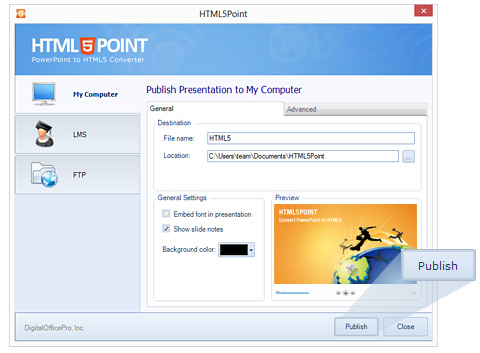
With HTML5Point you can publish your presentation to a drive on your machine or to any SCORM supported Learning Management System. You can also upload your output to any website via FTP button provided on the interface.

Publish and Share
Published output in HTML5 format can be shared on websites, blogs or to any social networking sites like Facebook, twitter etc. Unlike flash your html5 slideshow is mobile friendly and will work on all smart devices like iPad, iPhone and Android.
So with the new HTML5 slideshow you can 'view it faster', 'view it better and 'view it on the go'. And yes, the web is back with a bang.
HTML5Point - How it Works
Getting Started
After downloading HTML5Point, follow these steps to start using the program for converting PowerPoint presentations to HTML5 format. Install the software first. To install the software, double click on the .exe file and follow instructions. After installing the software, you will find the HTML5Point icon listed on desktop.
To start the program, double click the icon shown on Desktop or go to Start\All Programs\DigitalOfficePro\HTML5Point and click on HTML5Point.
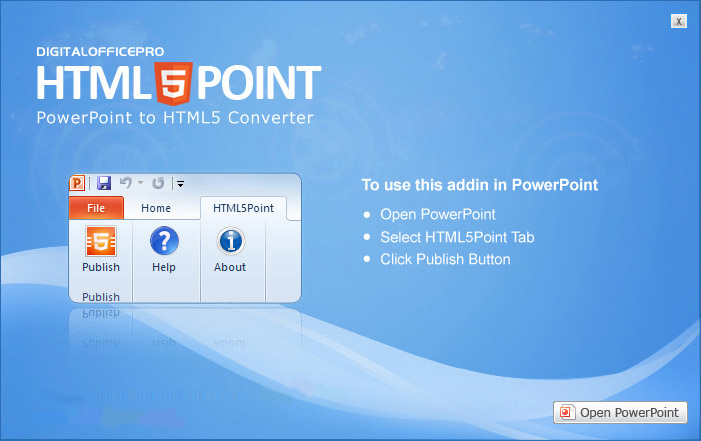
This will initialize the program and the main dialog of HTML5Point will be shown.
Product Activation
Go through the activation process before you start using a paid version of HTML5Point Converter. When you purchase the product, you will get a License Key. Using this key, activate the product. If you want to use the software in another computer you must deactivate the license from the current PC and activate the product on the new computer.
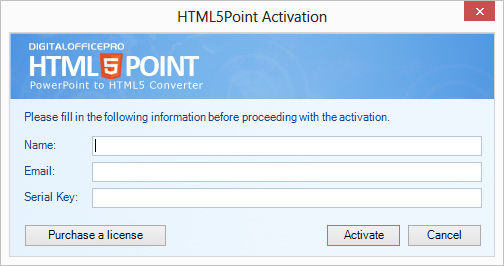
Follow the steps to Activate the product:
- 1. From the HTML5Point toolbar, click the Activate button to launch the activation wizard.
- 2. If you have a license, enter your name, email ID and serial key in the corresponding fields.
- 3. Click 'Activate' button to activate the product on your computer.
Publish Presentation
Open the PowerPoint presentation you want to convert as HTML5 file. To open PowerPoint presentation click on File-->Open OR just double click on the presentation you want to convert.
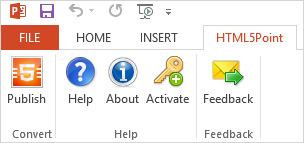
You'll find HTML5Point tab on the Ribbon as shown below:
Follow the steps below to publish presentation to My Computer:
- 1. Click the Publish button from the HTML5Point PowerPoint toolbar. HTML5Point program interface window appears.
- 2. From the interface select the 'My Computer' option
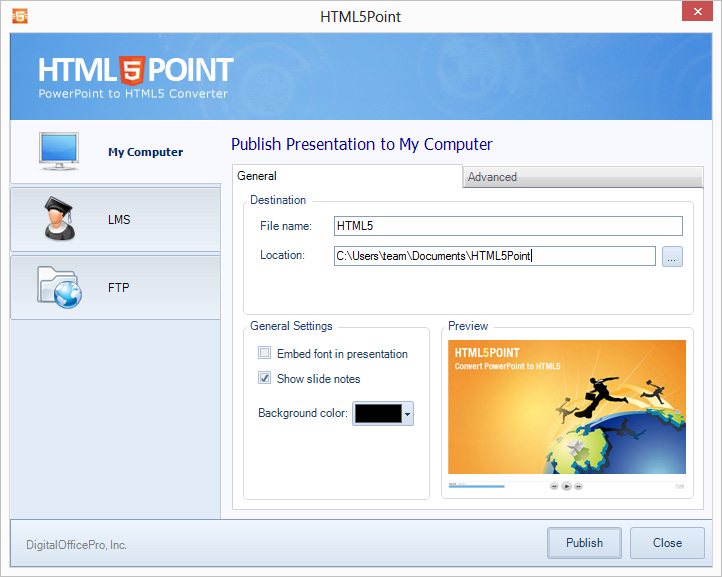
- 3. Type a name for the output HTML5 presentation in the 'File name' field.
- 4. Specify the output location of presentation in the 'Location' field.
- 5. Click the Publish button to publish your presentation. The conversion progress window will be shown.
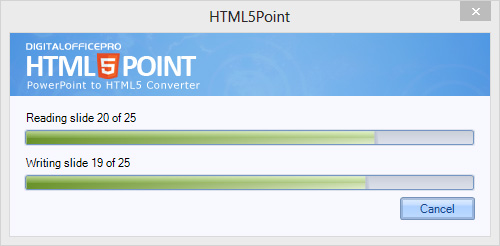
- 6.When the conversion process finishes, a conversion successful dialog appears. This window has two options: Show output folder and Preview presentation output.
- Embed font in presentation : Specify whether you want to embed the fonts used in the presentation while converting.
- Background Color : Select your desired color and set as background color of converted presentation.
- Media Quality : User can set the output image quality here. By default it is set to maximum quality.
- Preview : View the preview of your presentation here.
Preview Output
After completion of the publishing the presentation, preview window will be opened, where you can view the converted presentation output. There are four types of output preview options available.
- iPad : With this option you can see how the output works in Apple iPad's.
- iPhone : iPhone preview option helps you to see how the converted output works in Apple iPhone's.
- Android : Using this option user can view how the output works in Android devices.
- Browser : With this option user can see how the converted HTML5 output works in web browsers.
Publish Presentation to LMS
HTML5Point converter allows user to create LMS compatible HTML5 output.
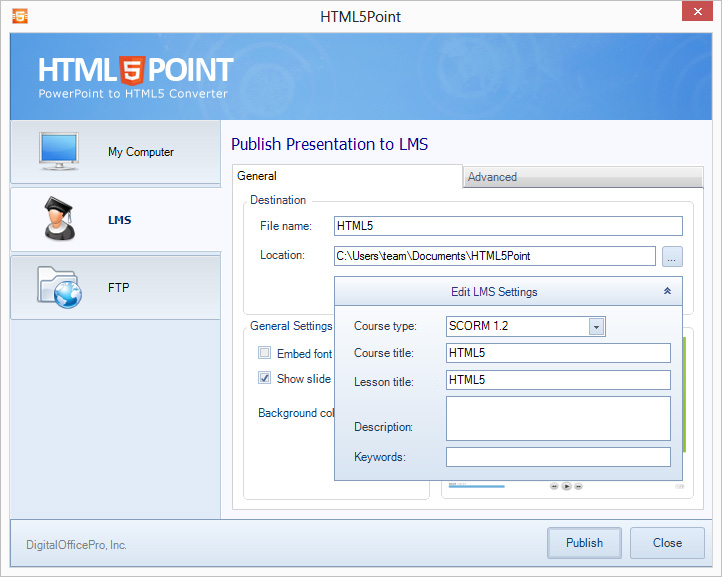
Follow the steps below to publish presentation to LMS:
- 1. Click the Publish button from the HTML5Point PowerPoint toolbar.
- 2. HTML5Point program interface window appears. From the interface select the 'LMS' option.
- 3. Type a name for the output HTML5 presentation in the 'File name' field.
- 4. Specify the output location of presentation in the 'location' field.
- 5. Click on the 'Edit LMS Settings' button to configure the LMS settings. You need to fill the following LMS information in the fields provided:
- Course type : Select the LMS course type from the drop down list.
- Course title : Enter your desired course title here.
- Lesson title : Specify the lesson title here.
- Description : Enter a brief description of your course (maximum 200 characters).
- Keywords : Enter your course keywords here. Keywords must be comma separated.
- 6. Click the Publish button to publish your presentation.
Publish Presentation to Server
HTML5Point converter allows user to upload converted HTML5 presentation to a web server using FTP.
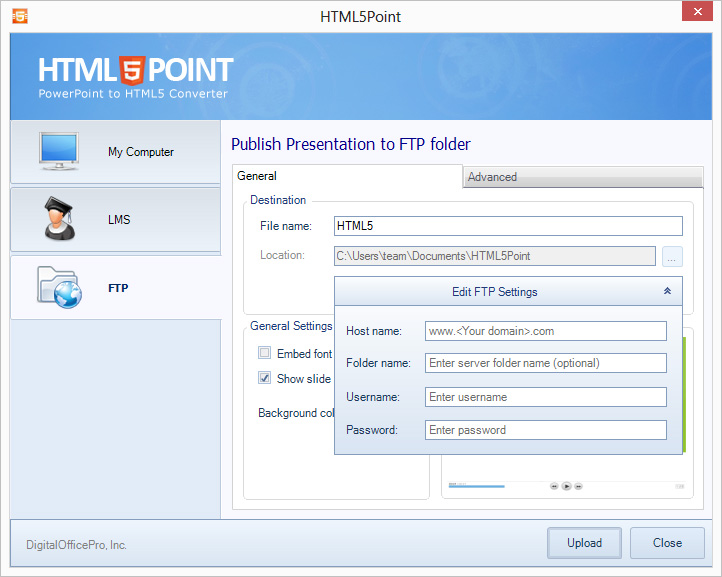
Follow the steps below to publish presentation to FTP server:
- 1. Click the Publish button from the HTML5Point PowerPoint toolbar.
- 2. HTML5Point program interface window appears. From the interface select the 'FTP' option.
- 3. Type a name for the output HTML5 presentation in the 'File name' field.
- 4. Click on the 'Edit FTP Settings' button to add server information. You need to fill the following FTP information in the fields provided:
- Host name : Enter your host name or an IP address of the server.
- Folder name : Specify the folder to where the files need to upload.
- Username : Enter your FTP server's username here.
- Password : Enter your FTP server's password here.
- 5.Click the Publish button to publish and upload your presentation.