The PowerFlashPoint PowerPoint to Flash SDK package
includes three sample flash players for viewing the
output flash files providing you with a choice to select an option as per your
requirement. Following are the 3 Flash Player coming with PowerFlashPoint SDK:
·
Lite Player
·
Classic Player
·
3D Player
During conversion time,
select the ‘Skin’ property of Player settings object and select the
How to get HTML Player
to function properly:
On successful conversion
of the PowerPoint files, the HTML player gets automatically copied to the
output location. What you need to do is run the Index.html file to view the
output.
When running the output
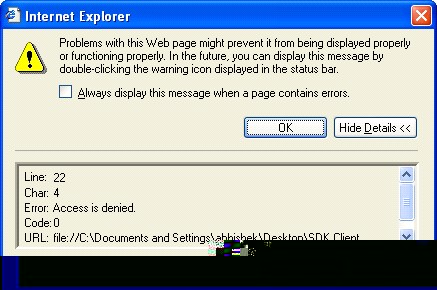
file through HTML player, there may be a Java Script based error “Access is
Denied”. This error usually occurs when executing the HTML file directly from
your local drive. Hence is preferred to
view the output file through IIS. (http://localhost/Test/Index.html).
To resolve this issue, launch
Internet explorer. Select \ tools \ internet options

Select Security tab
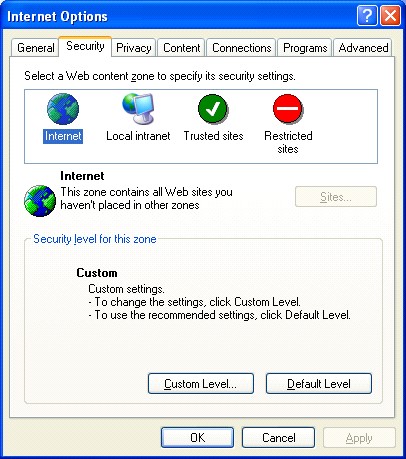
Select Custom Level and
Enable \ tick ON the
option ‘Initialize and script ActiveX controls not marked as safe’.
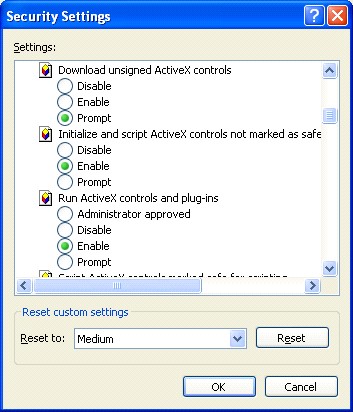
Enable the option
‘Initialize and script ActiveX controls not marked as safe’
Press OK twice on both screen message box.
From Internet Explorer click on refresh option
couple of times to refresh page. Now the error message will not be displayed
and it should work perfectly.